
Last Updated on 2026/08/29 by Tomylove
When deeply immersed in mixing in your DAW (Digital Audio Workstation), you often encounter moments that subtly disrupt your creative intuition.
This is especially true when applying a plugin like a compressor or saturator to a specific track and mixing the dry source with the wet effect.
“I want to blend in exactly 30% of the effect source…” but when you look at the knob, it is marked in decibels (dB) like -8 dB or -12 dB instead of a percentage (%), instantly halting your decision-making.
This is because the decibel (dB) values on your screen and the percentages (%) your ears intuitively perceive speak entirely different languages.
In this guide, we demystify the relationship between these two scales based on engineering principles and provide a real-time converter and a reference table to drastically boost your workflow efficiency.
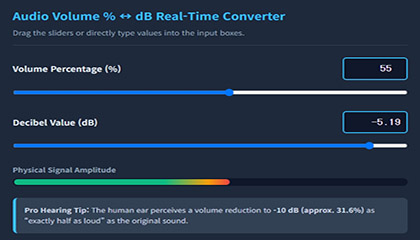
Audio Volume Percent (%) ↔ Decibels (dB) Real-Time Converter
You cannot calculate formulas in your head every single time.
Try moving the slider below, or directly input (type) your desired value into the numeric panel on the right.
Clicking the input box automatically highlights the entire number, making data entry extremely convenient. The two values sync in real time.
Bookmark this page on your browser and pull it up whenever you mix.
Audio Volume % ↔ dB Real-Time Converter
Drag the sliders or directly type values into the input boxes.
Why Are DAW Plugin dB Markings So Counter-Intuitive?
The human auditory system evolved to detect an incredibly wide range of sounds—from the whisper of rustling leaves to the deafening roar of thunder.
Expressing this vast range in a linear 0-to-100 percentage (%) scale would result in ridiculously large numbers. To solve this, we measure sound levels using a logarithmic (Logarithm) scale called decibels (dB).
This is where the disconnect happens.
While our intuition is wired for linear concepts like ‘50% = half’, the point where physical signal amplitude halves is not -50 dB, but -6 dB.
Furthermore, for the human ear to perceive a sound as “exactly half as loud” (Loudness), the volume must drop by approximately -10 dB.
Because of this logarithmic nature, adjusting dB knobs in a DAW can feel highly unintuitive when trying to dial in a mix balance.
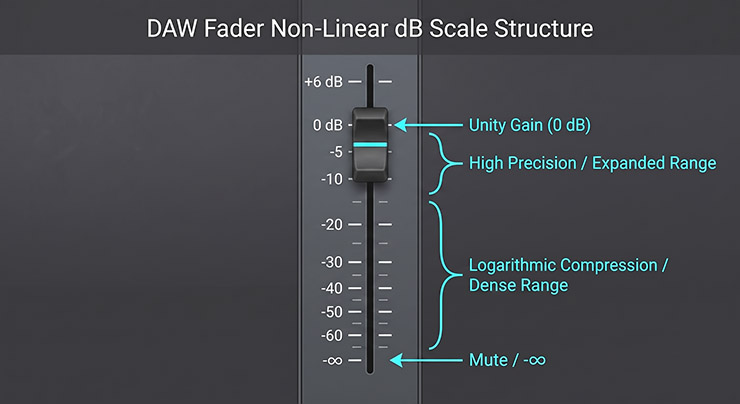
[Figure 1] Non-linear decibel (dB) markings on analog-style DAW faders
The Mathematical Bridge Between Percent and Decibels
The underlying engineering framework of this converter is governed by the 20 Log Rule, which is used to convert ratios of physical voltage or digital sample amplitude into decibels.
If we define the volume percentage as P (%) and the resulting decibel level as dB, the math scales as follows:
[Formula 1] Convert Percentage (%) to Decibels (dB)
[Formula 2] Convert Decibels (dB) to Percentage (%)
Understanding these formulas gives you ultimate command over the raw physical power of your digital audio signal, stripping away the guesswork behind plugin values.
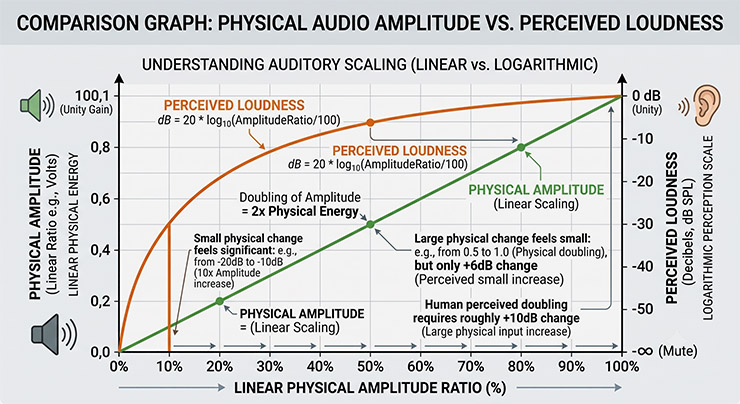
[Figure 2] Physical audio signal amplitude vs. human logarithmic loudness perception
At-a-Glance Audio Mixing Reference Table
This is a quick reference conversion table to speed up your mixing sessions.
Keeping these key reference points in mind will make controlling plugins much more intuitive.
| Volume Percentage (%) | Decibels (dB FS) | Perceptual Volume Change & Practical Mixing Use |
|---|---|---|
| 100% | 0 dB | Original untouched source level (Unity Gain) |
| 70.8% | -3 dB | Subtle volume drop. Ideal for fine-tuning lead instrument or vocal levels |
| 50.0% | -6 dB | Physical signal amplitude is cut exactly in half (electrical half-point) |
| 31.6% | -10 dB | Perceived loudness is cut exactly in half to the human ear |
| 10.0% | -20 dB | Significantly quieter. Perfect for background pads, FX, or ambient layers tucked behind the main mix |
Practical Mixing Tip: Applying to Parallel Mixing
This conversion math shines brightest during Parallel Compression or saturation blending.
This is an advanced technique where you take a track, apply extreme dynamic processing (Wet), and blend a subtle amount of it back into the untouched original (Dry) to inject weight and density.
Many plugins feature a Wet/Dry mix dial marked strictly in dB instead of percentages.
If you want to blend in “exactly 10% of the heavily compressed wet signal” to add bite, do not waste time guessing. Simply pull the wet level down to -20 dB.
By combining artistic sensitivity with engineering data, your mixing process gains incredible precision and absolute repeatability.
Frequently Asked Questions (FAQ)
Q. What happens to the dB value when I pull the volume down to 0%?
A. Mathematically, log10(0) approaches negative infinity (-∞). Therefore, absolute silence is represented as -∞ dB (minus infinity decibels) in digital audio systems.
Q. Why doesn’t the sound feel half as loud when I pull the fader down by -6dB?
A. Because human ears process sound energy logarithmically.
A -6dB drop halves the physical voltage/amplitude of the digital signal, but to make it feel half as loud to your brain, you need to pull it down to -10dB.