
Last Updated on 2026/07/18 by Tomylove
In the delicate architecture of audio mixing and music production, two core time-based processors undeniably dictate the perception of three-dimensional space and depth: delay and reverb.
When calibrated with surgical precision, these processors weave a lush, immersive sonic landscape; however, when spatial reflections clash awkwardly with the project’s native tempo, the resulting ambiguous tails muddy the low-mids and degrade the clarity of the entire mix.
While modern digital audio workstations and virtual effect plugins offer convenient ‘Sync’ features to automatically lock delay times to the host DAW tempo grid, seasoned mix engineers often intentionally decouple this automation.
By unlinking the strict grid, they can dial in micro-offsets in milliseconds (ms) or directly command analog outboard gear to infuse records with organic life and movement.
To execute this level of sophisticated sonic manipulation, translating the song’s BPM into absolute millisecond values remains an indispensable foundational step.

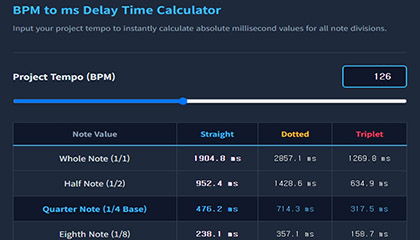
Interactive BPM to ms Delay Time Calculator
Input your project’s tempo (BPM) or smoothly adjust the slider below to calculate your timing grid.
The responsive matrix instantly maps out the exact millisecond values for straight notes, dotted rhythms that inject beautiful ambient motion, and triplets that introduce subtle, pocket-enhancing micro-grooves.
The input field is engineered to clear immediately upon clicking, ensuring a seamless and fluid user experience during intensive tracking sessions.
BPM to ms Delay Time Calculator
Input your project tempo to instantly calculate absolute millisecond values for all note divisions.
| Note Value | Straight | Dotted | Triplet |
|---|---|---|---|
| Whole Note (1/1) | – ms | – ms | – ms |
| Half Note (1/2) | – ms | – ms | – ms |
| Quarter Note (1/4 Base) | – ms | – ms | – ms |
| Eighth Note (1/8) | – ms | – ms | – ms |
| Sixteenth Note (1/16) | – ms | – ms | – ms |
| Thirty-Second Note (1/32) | – ms | – ms | – ms |
The Mathematical Formula: Converting BPM to Milliseconds
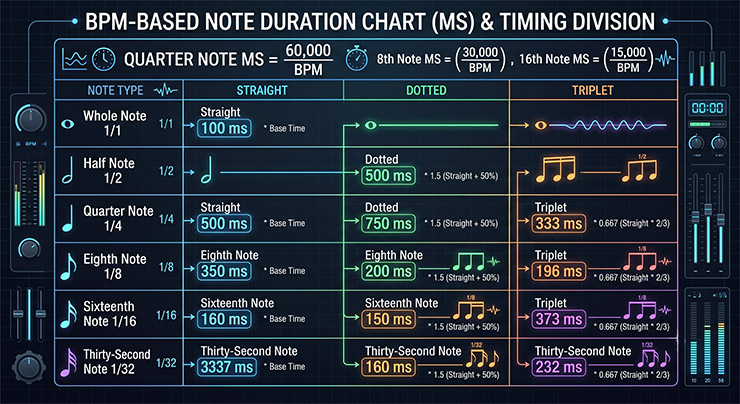
Because musical tempo is fundamentally quantified as Beats Per Minute (BPM), it serves as a physical measurement of how many quarter notes occur within one minute—or exactly 60,000 milliseconds.
Consequently, calculating the absolute temporal duration of a single standard quarter note relies on a clean, linear mathematical formula.
[Core Formula] Calculating the absolute millisecond value of a single Quarter Note
Using this master reference value as our mathematical foundation, an eighth note is derived by dividing the result by 2 (or multiplying by 0.5), and a sixteenth note is uncovered by dividing by 4 (or multiplying by 0.25).
To calculate dotted note variations, multiply the straight baseline value by 1.5; conversely, multiplying by 0.666 (a 2/3 ratio) precisely maps out the grid for triplets, completing the temporal equation.
Practical Production Guide: Fine-Tuning Reverb Pre-Delay
This mathematical translation yields its most powerful utility in the field when calibrating a reverb’s Pre-delay parameters during critical vocal or snare drum mixing sessions.
Pre-delay represents the brief window of time between the initial dry transient strike and the eventual onset of early reflections.
If this interval is mistakenly left at 0ms, the wet reverberation immediately overlaps and collides with the dry source signal, causing severe frequency masking.
This acoustic clash destroys vocal intelligibility, flattens the soundstage, and chokes the energy of the track.
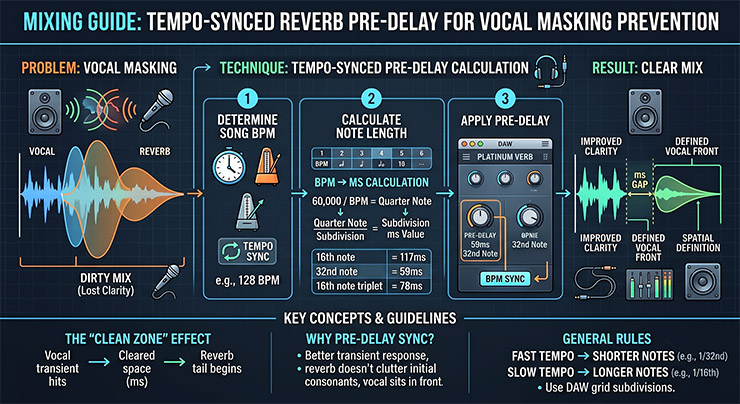
By matching your pre-delay precisely to a 16th-note, a 32nd-note straight value, or an elegant triplet subdivision calculated from the song’s BPM, a profound transformation occurs within your headphones.
The dry lead vocal punches cleanly through the center of the mix with uncompromised clarity, followed immediately by a supportive, lush reverb tail that blooms in perfect mathematical harmony with the rhythm of the arrangement.
This masterclass technique transparently governs your spatial layout, allowing you to build clean, professional modern mixes.
Frequently Asked Questions (FAQ) - Spatial Time Domain Laws
Q1. Why should I manually calculate millisecond values when host-sync functions exist in every plugin?
A1. While automatic synchronization perfectly locks echoes to the grid, it can inadvertently result in a rigid, sterile mix that lacks emotional nuance.
Professional engineers manually calculate millisecond baselines so they can introduce deliberate, micro-timed human offsets.
Applying a slight negative (-) offset can generate urgent, forward-leaning rhythmic tension, while dialling in a subtle positive (+) offset introduces a relaxed, organic lag reminiscent of vintage analog tape echos, noticeably widening the three-dimensional depth of a record.
Q2. What emotional and rhythmic characteristics do Straight, Dotted, and Triplet delays introduce to a mix?
A2. Straight delays lock symmetrically with the rhythm to provide predictable structural stability and reinforcement.
Dotted delays—extending the baseline note value by 1.5x—dance gracefully across the grid, generating majestic, cascading textures that excel in ambient, cinematic, or spacious guitar soundscapes.
Triplet delays compress three separate notes into the traditional space of two, carving out a syncopated, shuffle-like polyrhythm that pushes a track forward with kinetic momentum.
Q3. How do I choose between a 16th-note and a 32nd-note millisecond value when setting my reverb pre-delay?
A3. This decision hinges entirely on the density of your arrangement and the project’s overall tempo.
In high-tempo pop or hip-hop tracks featuring dense, rapid vocal deliveries, mix space is at a premium; opting for a brief 32nd-note pre-delay prevents the reverb tail from overlapping and cluttering subsequent syllables.
Conversely, in slow ballads or minimalist acoustic arrangements, selecting a longer 16th-note pre-delay creates a distinct physical separation that allows the dry source to command an intimate, front-row presence.
Q4. Does the standard conversion formula remain fully valid for complex meters like 3/4, 5/4, or 6/8 time signatures?
A4. Yes, the core equation remains fully intact because the universal definition of BPM counts the fundamental pulse of a quarter note, regardless of the time signature’s numerator.
However, when mixing a compound meter like 6/8, where a dotted quarter note acts as the primary macro-pulse, you should first multiply your quarter-note millisecond result by 1.5 to map the main pulse, and then divide downwards to align your spatial effects perfectly with the musical phrasing.